
Every feature your space needs.
One platform for coworking, not a stack of duct-taped tools, and no add-on menu to buy it from.
Bookings & spaces
Desks and rooms on one calendar, with plan hours, pricing, and policies applied for you.
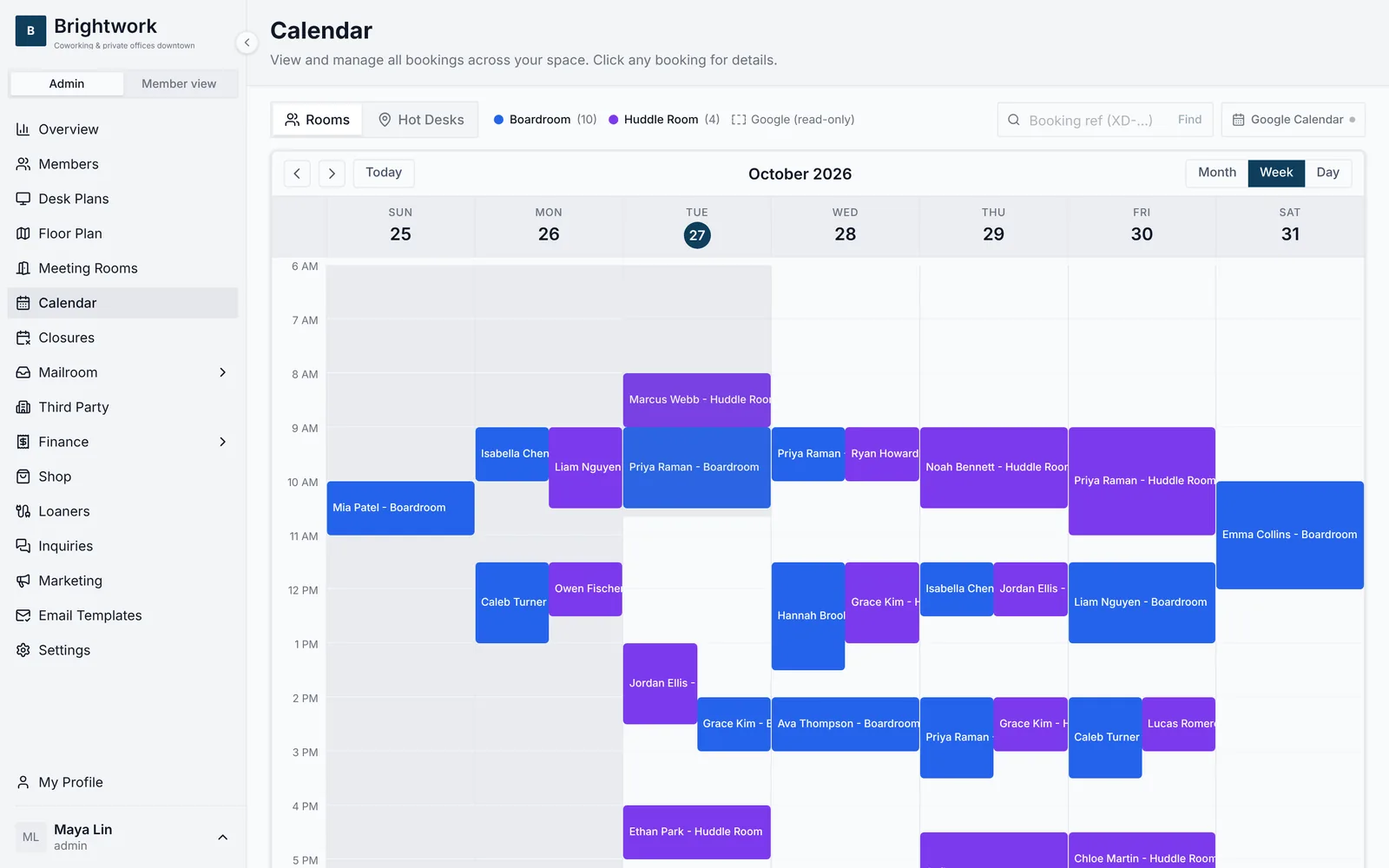
Hot desks
Book by the hour or the day, or include them in a monthly plan. Conflicts are prevented on the server, not just in the UI.
Dedicated desks
Assign a desk to a member for the life of their plan, with a printed name sign.
Meeting rooms
Hourly booking on a calendar. Included plan hours are used first, then the room's rate applies.
Drop-in pricing
Day passes and hourly rates for non-members, with coupons.
Booking references
Every booking gets a unique reference that staff can search, and that appears in confirmations.
Company bookings
Book a room for a company and its point of contact gets the confirmation. Failed notices can be retried.
Desk QR & NFC check-in
Print a QR card for one desk or all of them. Members scan to check in; staff can mark walk-ups in use.
Closures
Schedule a holiday or a shutdown. Bookings inside it are cancelled, credits restored, cards refunded, and members emailed.
Booking policies
Advance-booking windows, hours, and member schedules are set once in Settings and enforced everywhere.
Google Calendar
Connect a Google Calendar to sync bookings and see its events overlaid on your rooms.
Floor plan
A map of your space that shows, live, which desks and rooms are free, and who's actually here.
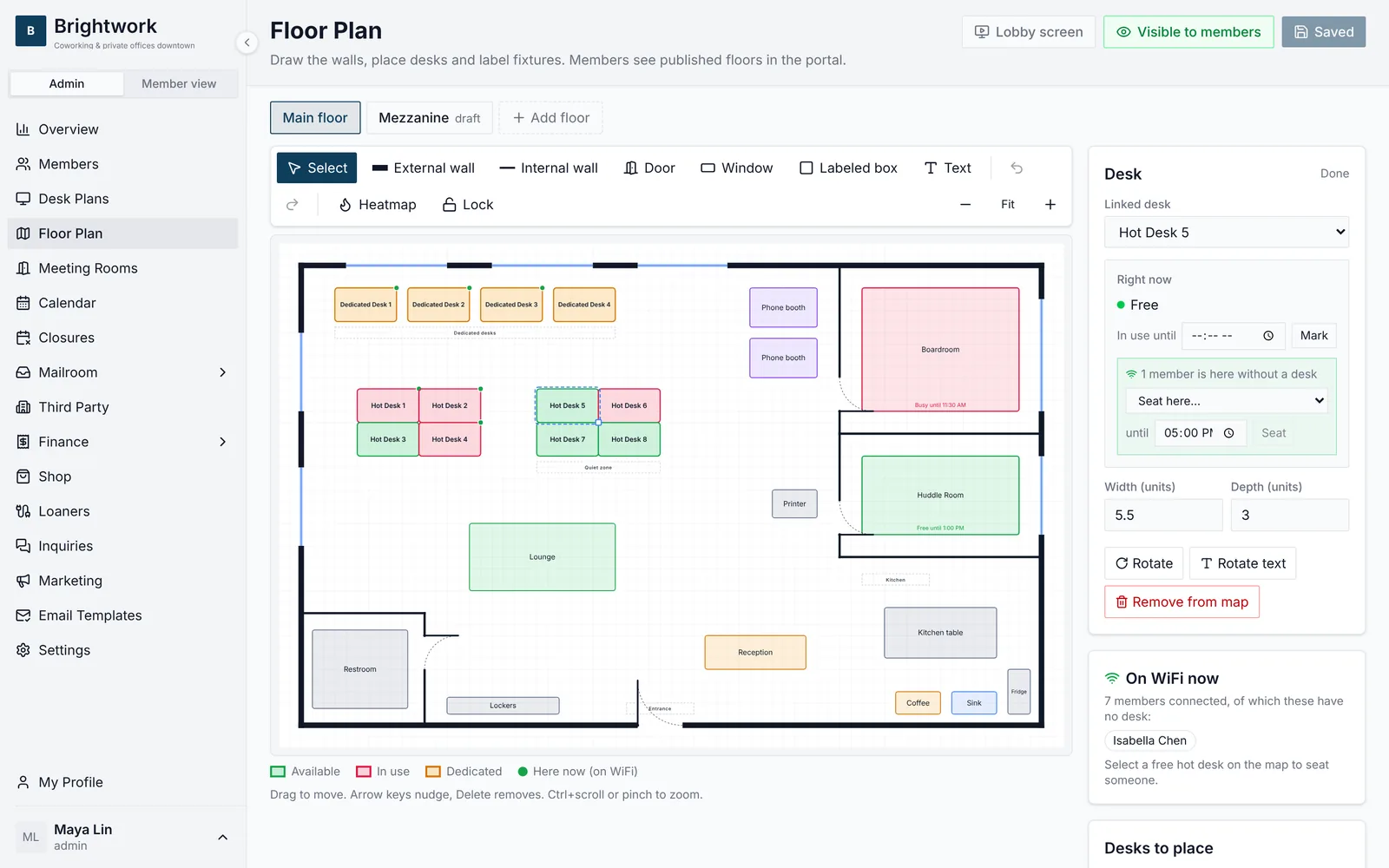
Floor plan designer
Draw external and internal walls, doors, and windows on a grid, then place your desks, labeled boxes for the kitchen or lounge, and text. Sizes are in units you choose.
Rotate, flip, and lock
Rotate desks, boxes, and labels, flip a door's swing, undo and redo, and lock a finished floor so a stray drag can't move anything.
Several floors
Add a floor per level or wing. Keep a floor as a draft until it's ready, then make it visible to members.
Live desk and room status
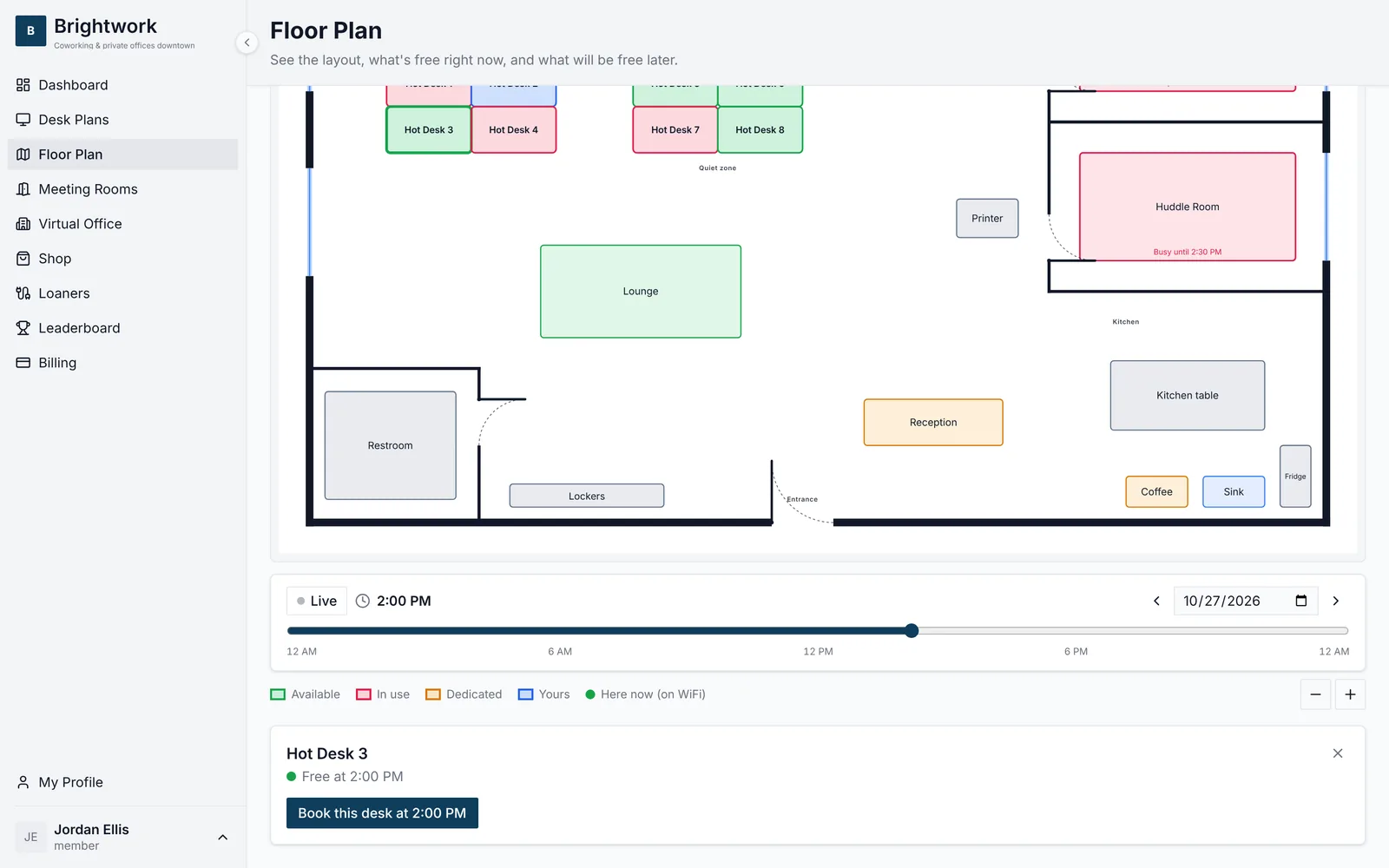
Desks show available, in use, dedicated, or yours, and rooms show busy or free until when. Members see that a desk is taken, never who has it.
What's free later
Members drag a time slider or pick another day to see what will be free, then book the desk or room from the map.
Here now
A green dot marks desks whose member is on your Wi-Fi right now, so you can see who actually showed up.
Seat and move from the map
Seat a member who's on the Wi-Fi without a desk, mark a desk in use, or move a booking to another free desk.
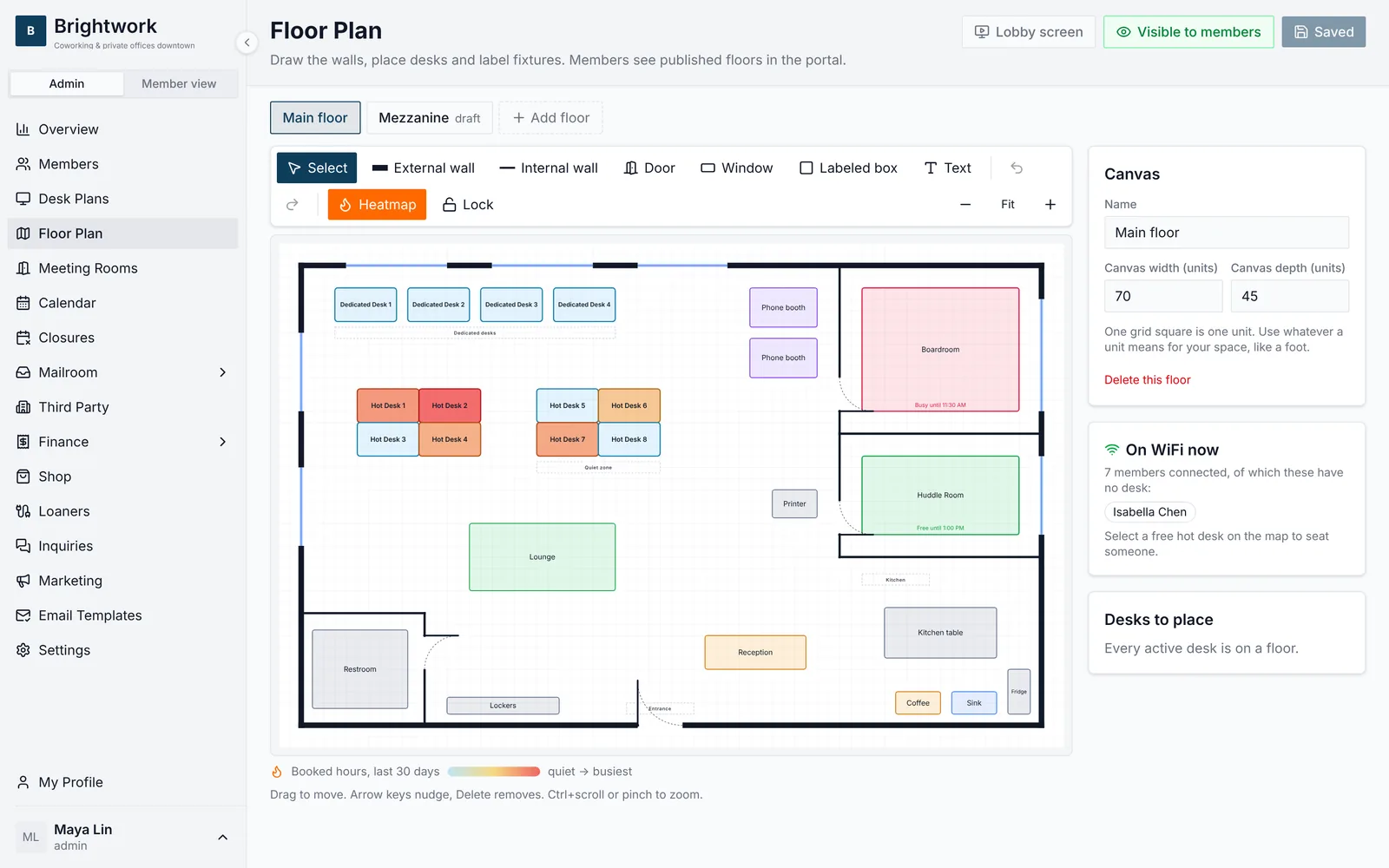
Usage heatmap
Booked hours per desk over the last 30 days, so you can see which desks people want and which sit empty.
Lobby screen
A full-screen, auto-refreshing map for a TV or tablet at reception, with desks free, rooms free, and the time.
Billing & invoicing
Recurring revenue on your own Stripe account, and clean books for the members who pay by check.
Stripe Connect
Each space uses its own Stripe account. Money goes straight to you, and we never see a card number.
Plans and billing cycles
Monthly, six-month, and annual plans, anchored to the 1st with proration. Lock existing members at their current price when you change rates.
Invoices
Every charge is an itemized, numbered invoice. Filter by status and date, charge the card, email it, refund, void, or write off.
Check & offline payments
Members can be set up to pay by check. Their invoice is issued right away, and the payment is recorded against it when it arrives.
Receive Payments
Pick the open invoices a check covers and record it once. Check, cash, or other, with a reference number.
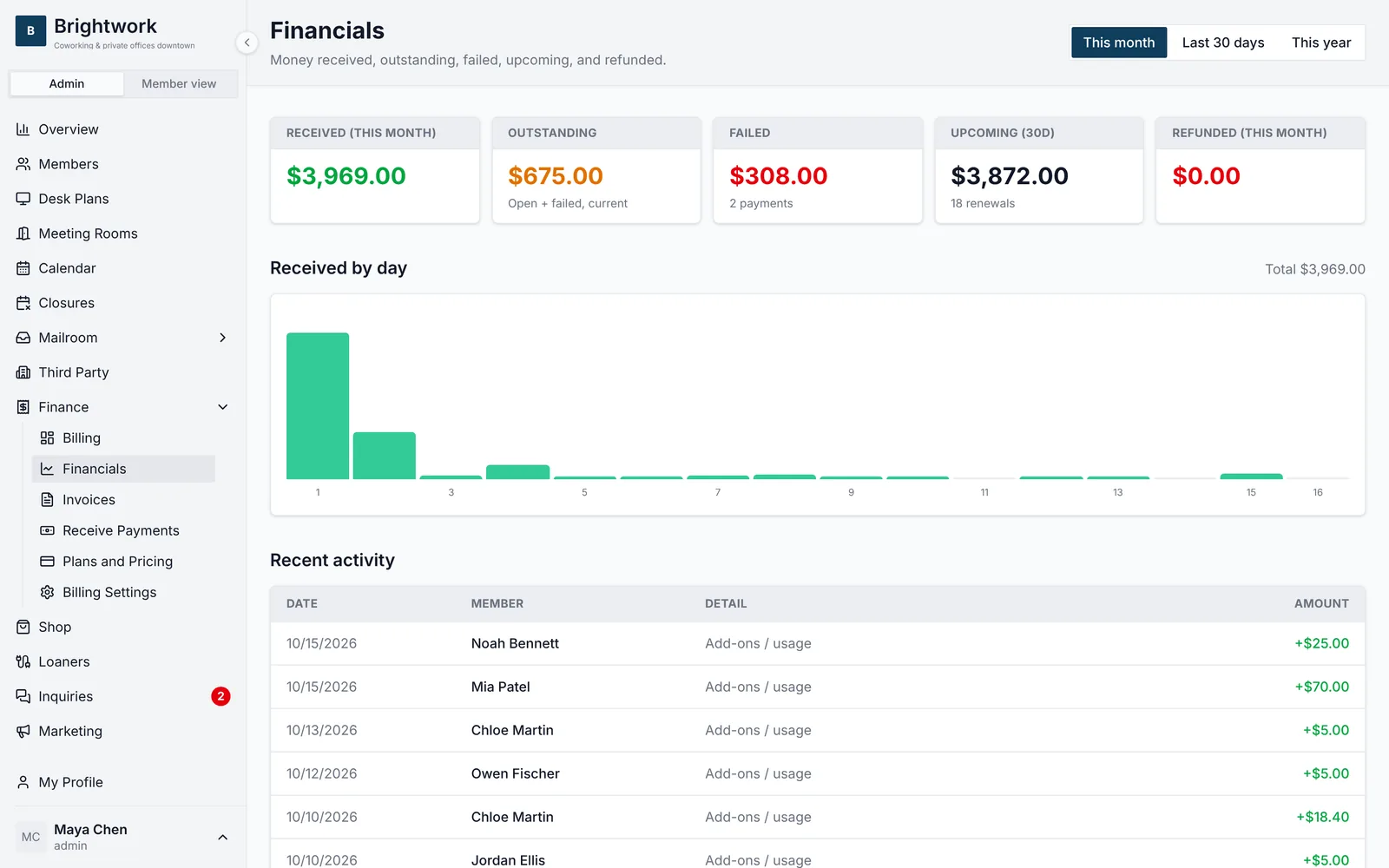
Financials
Received, outstanding, failed, upcoming, and refunded, by month, 30 days, or year, with a daily revenue chart.
Card and ACH
Members keep cards and bank accounts on file. ACH payments are tracked until they settle.
Retries and enforcement
Failed payments retry on your schedule, and access can be paused for members who stay past due.
Account credit
A real ledger. Refunds can become credit, and downgrades issue credit instead of refunds.
Coupons and trials
Percent or fixed discounts, per plan or service, with limits and expiry. Free trials that convert on their own.
Advance invoicing
Send next term's invoice ahead of time, with your own numbering and business details.
Virtual mailbox
A mailroom with queues, deadlines, and the CMRA paperwork built in.
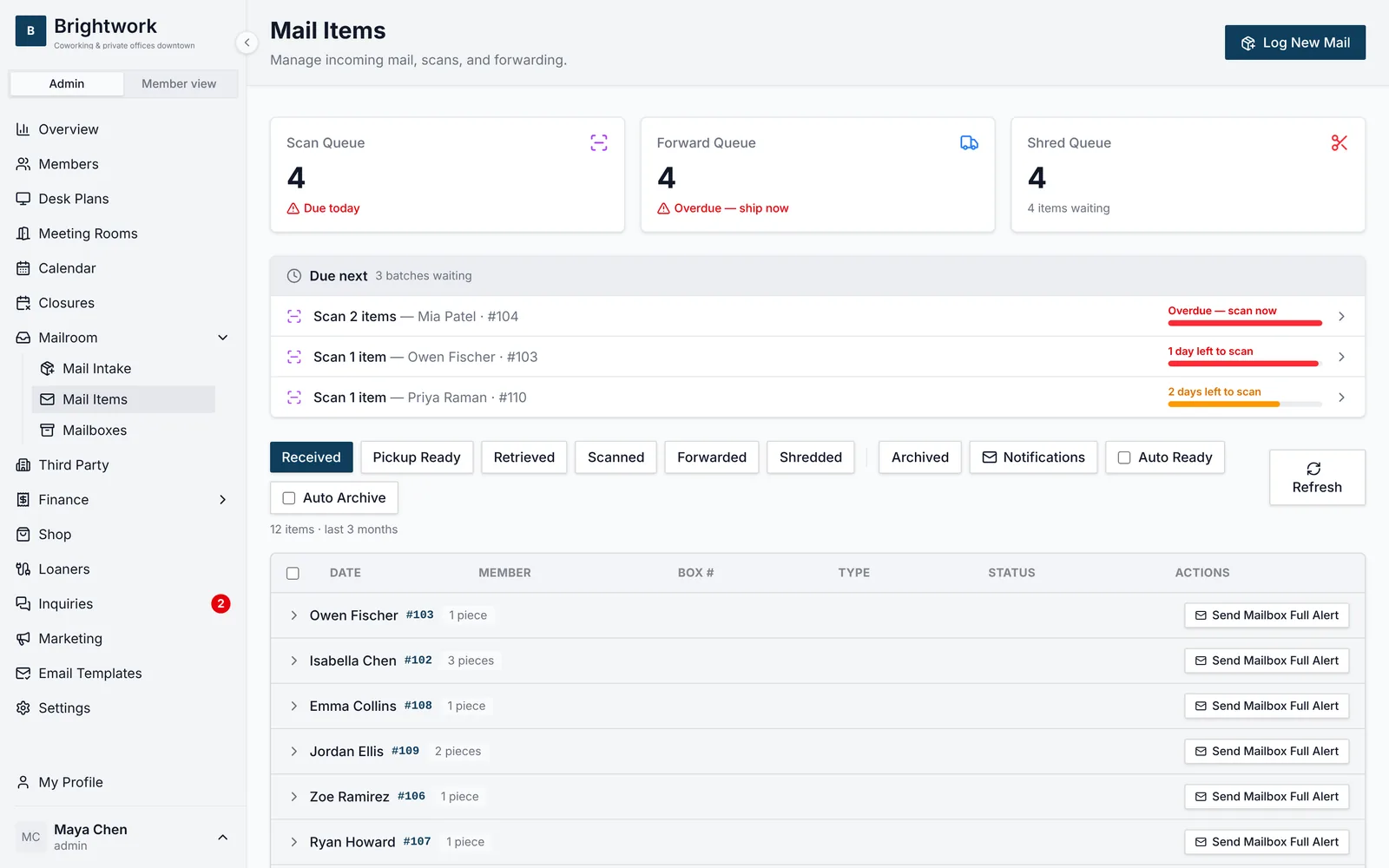
Mail intake
Log mail in seconds at the desk, in a batch, or from a phone in the mailroom. Members are notified right away.
Scan, forward, shred, pickup
Members choose what happens to each item. Forwarding cost is worked out from weight and speed.
Work queues with deadlines
Scan, forward, and shred queues show what's due today and what's overdue.
Batch forwarding
Bundle several items into one shipment, enter postage once, and bill it.
Auto-ready and auto-archive
Mail can mark itself ready for pickup after a delay you choose, and archive after a set number of days.
PS Form 1583 and ID
Generate the form, collect the signature and ID, approve, and activate. Missing paperwork is flagged and members are nudged.
Verification letter
Members download a proof-of-address letter for banks and business licenses.
Mailbox pool and waitlist
Number ranges, reserved boxes, and a waitlist that offers released boxes with a 48-hour claim window.
Company mailboxes
Bill a company for its employees' mailboxes on one consolidated statement.
Members & portal
A portal that works on a phone, so members stop asking the front desk for things they can do themselves.
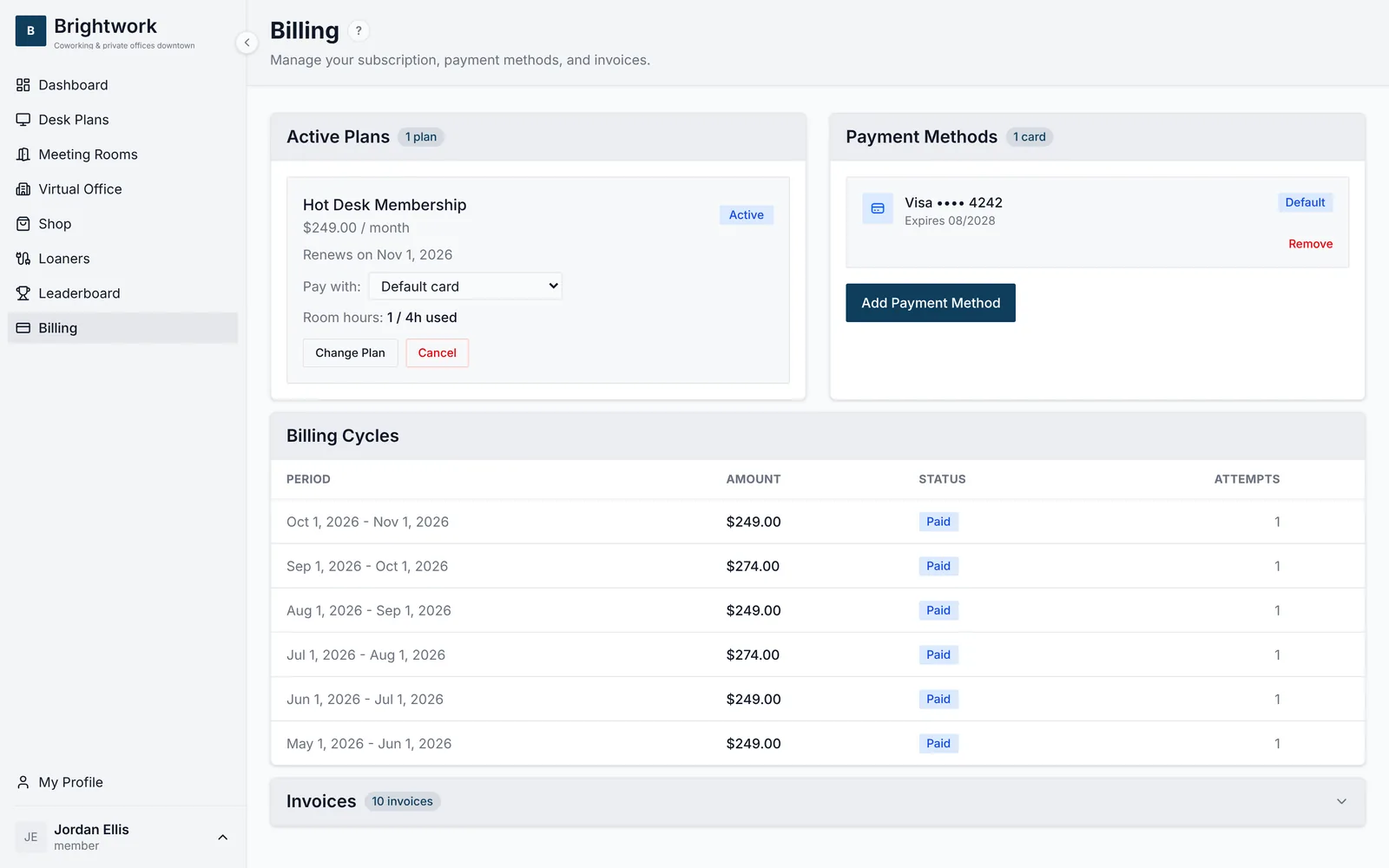
Member portal
Dashboard, bookings, billing, mail, shop, loaners, and help in one place. Mobile-first, nothing to install.
Self-serve signup
Members pick a plan, add a card, and they're in.
Membership and billing pages
Members change plans, manage cards, and see every invoice and billing cycle themselves.
Member directory
Search and filter members, and open anyone's plans, credits, Wi-Fi hours, door access, invoices, bookings, documents, and audit log.
Roles and statuses
Member, staff, and admin roles. Invite, re-invite, suspend, or deactivate.
Door-key requests
Members ask for a fob or Virtual Key and upload a photo ID; you approve from the Overview.
Leaderboard
A friendly ranking of who's in most, with privacy-masked names and titles from Fresh Face to Space Legend.
Help Center
Searchable how-to articles, linked from a help icon on every page.
Marketing & inquiries
Turn website visitors into members and quiet members back into regulars.
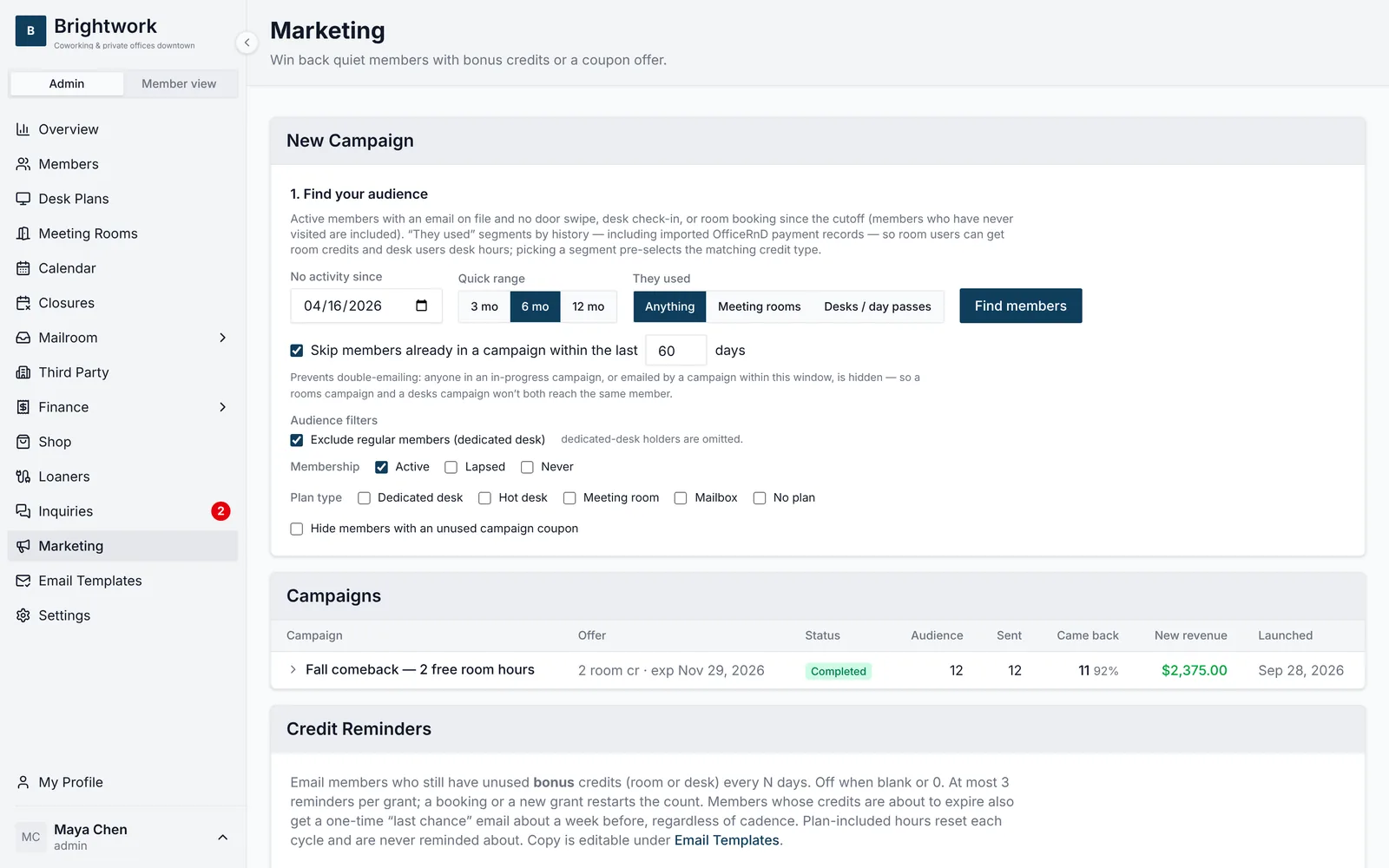
Win-back campaigns
Find members who haven't been in since a date, filtered by plan, status, and what they used. Offer bonus hours or a coupon.
Campaign results
See who came back, credits used, coupons redeemed, new subscriptions, and new revenue.
Credit reminders
Members with unused bonus credits get a reminder before they expire.
Inquiries inbox
Contact-form submissions and contacts in one list, with statuses, a promo opt-in list, and CSV export.
AI-drafted replies
Compose a reply to an inquiry drafted from your own plans and rates, edit it, and send it as a branded email.
Email templates
Edit the wording of the automated emails your members receive so they sound like you.
Corporate & third-party accounts
For the companies that send you people and want one bill.
Company accounts
Link members to a company with its contacts, documents, and mailboxes.
Contracted rates
Set a company's rates, fixed or as a percentage, and flag anything non-standard.
E-signed rate agreements
Send a signing link; the executed agreement is saved as a PDF.
Payment arrangements
Either you invoice the company, or the partner remits payment to you.
Consolidated statements
One monthly statement per company, with editable lines and overdue reminders.
Doors, Wi-Fi & print
The building side of the business, tied to who's actually a member.
Door access
UHPPOTE controllers driven by membership: cards and fobs, Virtual Keys, doors, and a log of granted and denied entries.
Access schedules
Time windows that limit when a member can get in and book.
Member Wi-Fi
Members log in with their own credentials (RADIUS). Time on Wi-Fi counts toward metered desk hours.
Over-limit handling
Members who pass their included hours get an email and a one-click switch to pay hourly.
Partner guest access
One Wi-Fi credential per booking partner, so marketplace guests can get online.
Router guides
Setup guides for MikroTik, UniFi, SonicWall, and generic routers.
Print tracking
Print jobs matched to the member who sent them, with page counts, for optional per-page billing.
Front desk & operations
The small jobs that used to live on sticky notes.
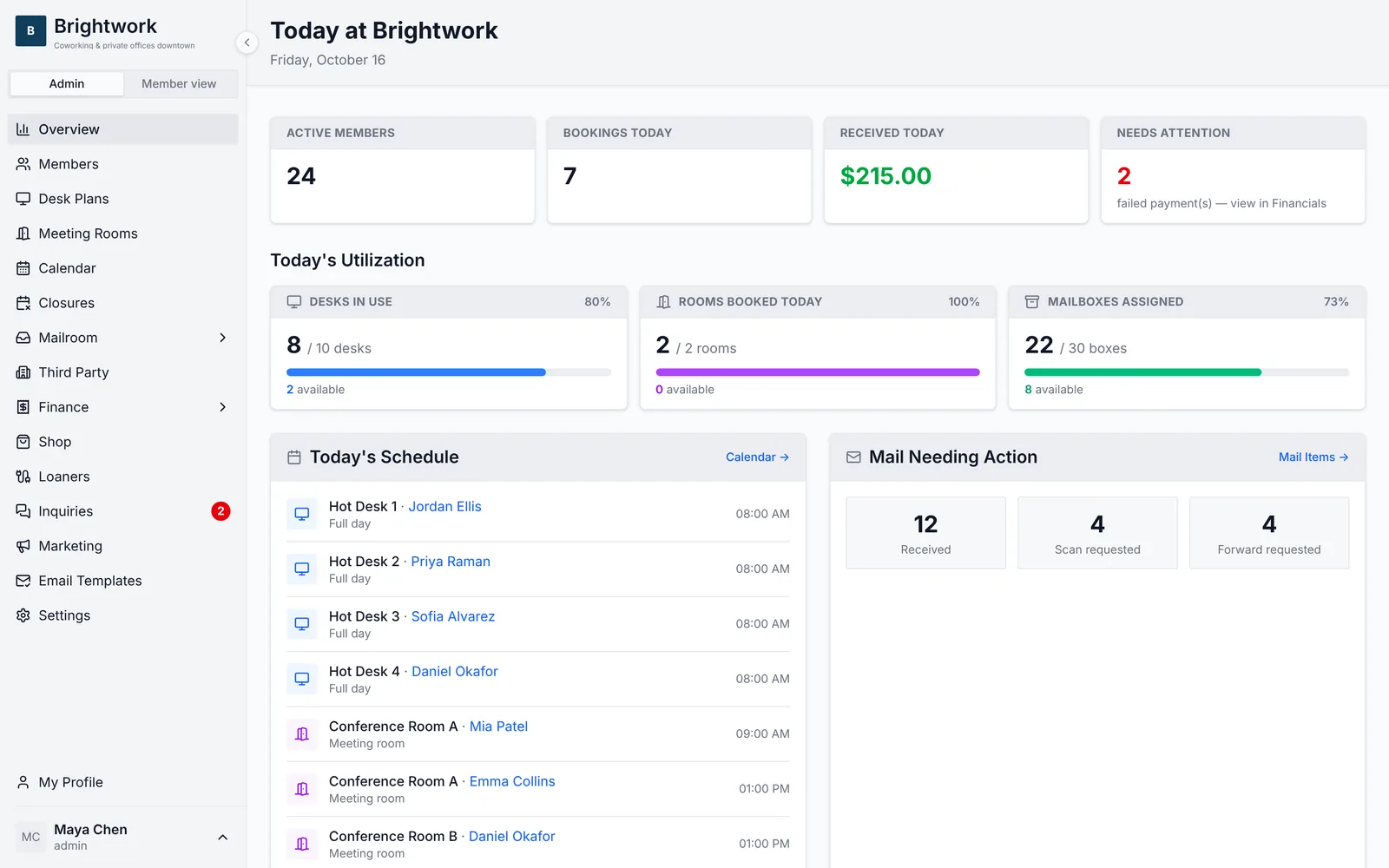
Admin Overview
Today's members, bookings, money received, utilization, schedule, who's in, mail needing action, loaners out, and anything flagged.
Shop
Sell coffee, snacks, supplies, or day lockers, charged to the member's card.
Loaners
Lend monitors, hubs, and adapters with due dates, return reminders, overdue notices, and a lost-item charge.
Space settings
Logo, colors, timezone, currency, address, hours, and booking rules, editable without a support ticket.
Your domain, your brand
Run on yourspace.xpressdesk.com or fully white-label on your own domain.
Your public website
A marketing site for your space, with pricing blocks that read live from your real plans, so rates never go stale.
Screenshots show a demo space with sample members and data.
Ready to run your coworking space on autopilot?
We'll walk you through it, set your space up, and you'll be live in a day.
Month to month. No annual contract, and no setup fee.